
This post is a write-up for the “Security Footage” challenge on TryHackMe. The challenge description reads:
“Someone broke into our office last night, but they destroyed the hard drives with the security footage. Can you recover the footage?”
We’re provided with a .pcap file (packet capture) that presumably contains the remaining trace of the lost footage.
Analyzing the PCAP File
Start by opening the .pcap file in Wireshark. Right-click on one of the TCP packets and select: Follow > TCP Stream
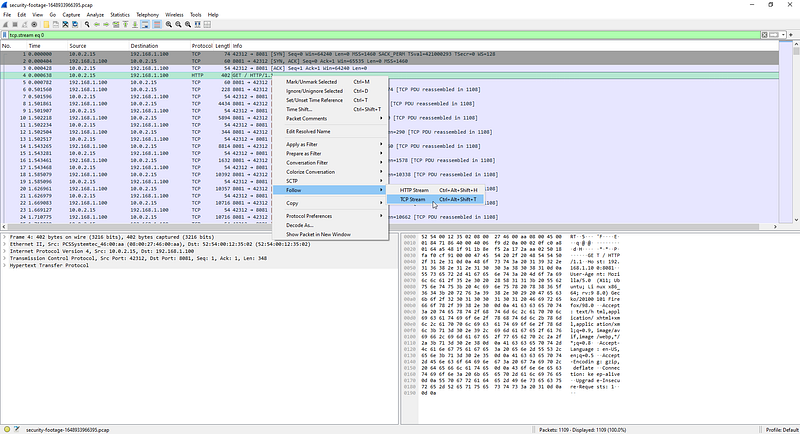
This opens a reconstructed view of the TCP communication. Here’s a breakdown of what we see:
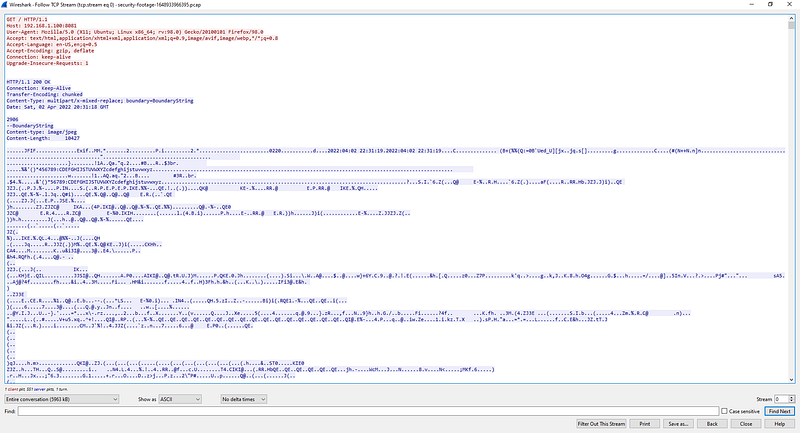
HTTP Communication Breakdown
Client Request (GET)
The client initiates a standard HTTP GET request:
GET / HTTP/1.1
Host: 192.168.1.100:8081
User-Agent: Mozilla/5.0 (X11; Ubuntu; Linux x86_64; ...)
Accept: text/html,application/xhtml+xml,...
Server Response
The server responds with:
HTTP/1.1 200 OK
Connection: Keep-Alive
Transfer-Encoding: chunked
Content-Type: multipart/x-mixed-replace; boundary=BoundaryString
Here’s what’s important:
- Transfer-Encoding: chunked
The response body is sent in segments, each starting with the length in hexadecimal (e.g., 2906 = 10,502 bytes). - Content-Type: multipart/x-mixed-replace
This format is typically used for streaming video — especially MJPEG (Motion JPEG). - boundary=BoundaryString
Used to separate individual JPEG frames.
Understanding MJPEG
The MJPEG stream consists of repeated parts like:
--BoundaryString
Content-type: image/jpeg
Content-Length: 10427

...binary JPEG data...
Each segment starts with metadata, followed by raw JPEG binary content. You’ll notice the JPEG file header: JFIF. This means we’re essentially looking at a continuous stream of JPEG images — perfect for reconstructing a video.
Extracting Frames and Rebuilding the Video
To automate the extraction and video creation, I wrote a Node.js script (with help from ChatGPT) that parses the .pcap file, reassembles the TCP stream, extracts each MJPEG frame, and uses FFmpeg to compile the frames into a playable video.
You can find the full script on my GitHub repository.
Once you run the script, you’ll get:
frame_0000.jpg, frame_0001.jpg, …
output_video.mp4 — the reconstructed video
Recovering the Flag
After compiling and playing the video, you’ll see the flag scrolling across a phone screen captured by the security camera.
Conclusion
This was a great example of real-world forensics, showing how even deleted or “lost” footage can sometimes be recovered from network traces. The challenge tested not only packet analysis but also media reconstruction techniques.